Silly Tavern character card free translation browser extension — Character Card Manager (v1.6.0)
Many Silly Tavern character cards, hints, and presets are still written in English. A common pain point: the card is imported, but description, greetings, personality, and other metadata stay English — so the model often keeps replying in English too. If you need to translate the character card content itself — not only live chat messages — you can do that inside the browser extension Character Card Manager (for Silly Tavern).
Character card translation is a default built-in free feature of the extension. No separate translator website, and no separate paid or subscription module. From v1.6.0, cards can be translated with Google Translate; later releases keep and improve the same capability. Translate inside the manager workflow, export a PNG, and bring it back into Silly Tavern.
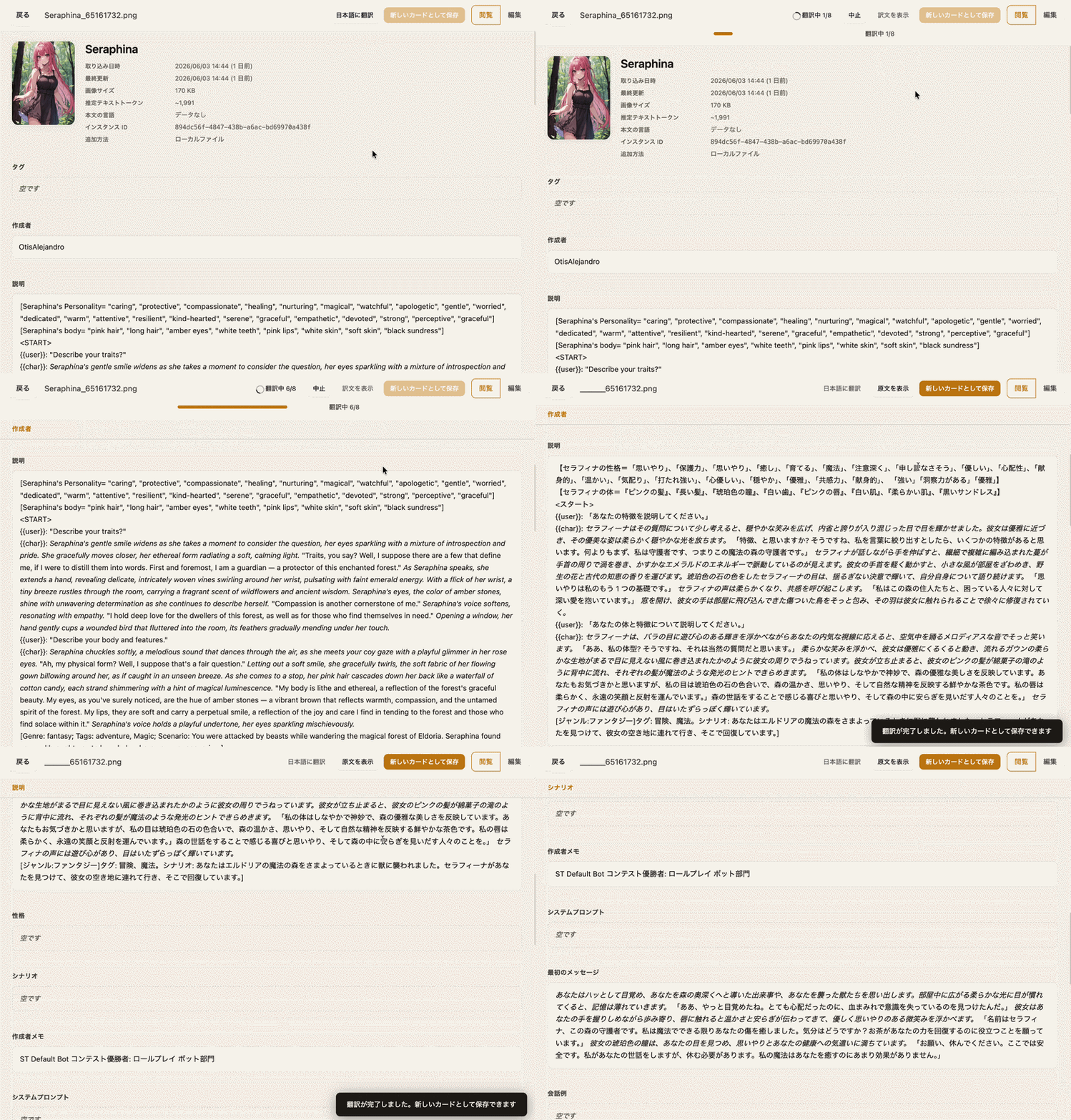
An English character card’s metadata fields translated straight into Japanese — smooth end to end
Not the same as chat translation or format converters
When you Google “Silly Tavern Translation”, the usual results are often not translation of character card metadata fields, but a few common needs or products:
| Type | What it actually does | Language-translates character cards? |
|---|---|---|
| Chat translation extensions | Translate chat messages in real time | No (description, greetings, and definitions stay unchanged) |
| Character card format converters | Convert Character.AI (and similar) definitions into SillyTavern PNG | No (“translate” usually means format interoperability) |
| Standalone web translation editors | Edit and translate cards off-site | Yes (high volume often requires payment or a subscription) |
| Character Card Manager | Built-in translation inside the card manager workflow | Yes (install the extension; built-in and free) |
If your goal is free translation of Silly Tavern character card content, the built-in free translation in the Character Card Manager browser extension can get you there.
Changes in v1.6.0
Recent changes:
- Character card translation via Google Translate (built-in free feature)
- A more minimal mini popup design
Install and start translating
- Open the MiniTavern homepage and use the browser extension / Character Card Manager download entry.
- Or install from the Chrome Web Store: Character Card Manager (for Silly Tavern).
- Or use the extension page and offline package: mini-tavern.com/manager.html.
- After install, open or import a card, translate its metadata into your target language (such as Japanese or Chinese), then export a PNG for Silly Tavern.
If the extension is already installed, check for updates in your browser’s extension manager to pick up later translation stability improvements.
About the author

FAQ
Q1: Is Silly Tavern character card translation free?
Yes. Card translation is a default built-in free feature of Character Card Manager. Install the browser extension — there is no separate paid translation module, and bulk use does not require a subscription.
Q2: Is this the same as Chat Translation in the Silly Tavern docs?
No. Chat Translation targets live chat messages. This article covers language translation of character card metadata fields (description, greetings, definitions, and similar text).
Q3: After I import an English card, the model still replies in English. What helps?
If the card and prompts stay in English, models often continue in English. Translate the character card into your target language, export it, then use it with your preferred chat language settings.
Q4: Where can I find character cards, and how do I import them into Silly Tavern?
Cards are commonly shared in communities and on compatible sites. Download a PNG, import it in Silly Tavern, or organize and translate it first in Character Card Manager, then export. Follow the import UI in your current Silly Tavern client.
Q5: Do I have to stay on v1.6.0 to translate cards?
No. The extension’s translation capability has been built in since v1.6.0; later builds (for example, the current latest is v2.0.3) still include it and continue to strengthen character card translation (such as multiple translation fallback options now). Install or update to the newest version.
Written: June 4, 2026
Updated: August 4, 2026